Mobile Hacking: #1 - Setting Up An Android Pentesting Environment
I often forget how to do this. So I’m posting it here so that I can come back when I need it (content poverty laughs from the corner).
Prerequisites:
- Android Studio (or just the SDK tools if you’re a nerd)
- Android Virtual Device (I don’t like Genymotion)
- Python
- Conda or any other environment manager (optional but recommended)
If the SDK binaries are not in your PATH environment variable, paste the following in your .bashrc or equivalent.
export ANDROID_HOME=$HOME/Library/Android/sdk
export PATH=$PATH:$ANDROID_HOME/emulator
export PATH=$PATH:$ANDROID_HOME/tools
export PATH=$PATH:$ANDROID_HOME/tools/bin
export PATH=$PATH:$ANDROID_HOME/platform-tools
export PATH=$PATH:$ANDROID_HOME/cmdline-tools/latest/bin
Setting Up The SDK And Emulator#
- Go to
Android Studio -> Tools -> SDK Manager - From the
Android 12.0 ("S")dropdown, select the SDK Platform, Sources, and Google Play ARM 64 system image.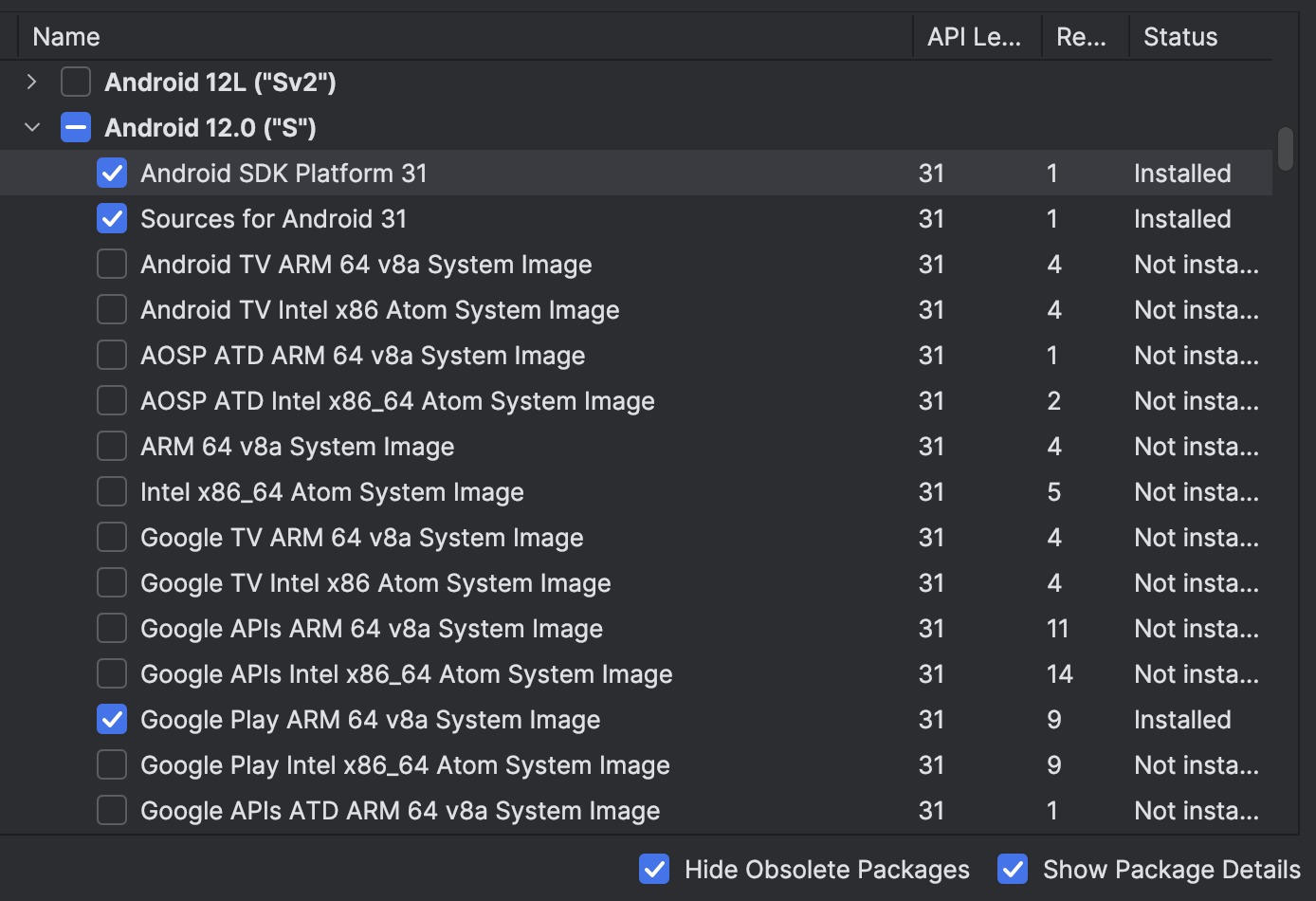
- After finishing the SDK setup, go to
Tools -> Device Managerand create a virtual device. - Choose
Medium Phoneas the device, give it a name and chooseAPI 31 "S"; Android 12.0(personal preference, you can choose any API).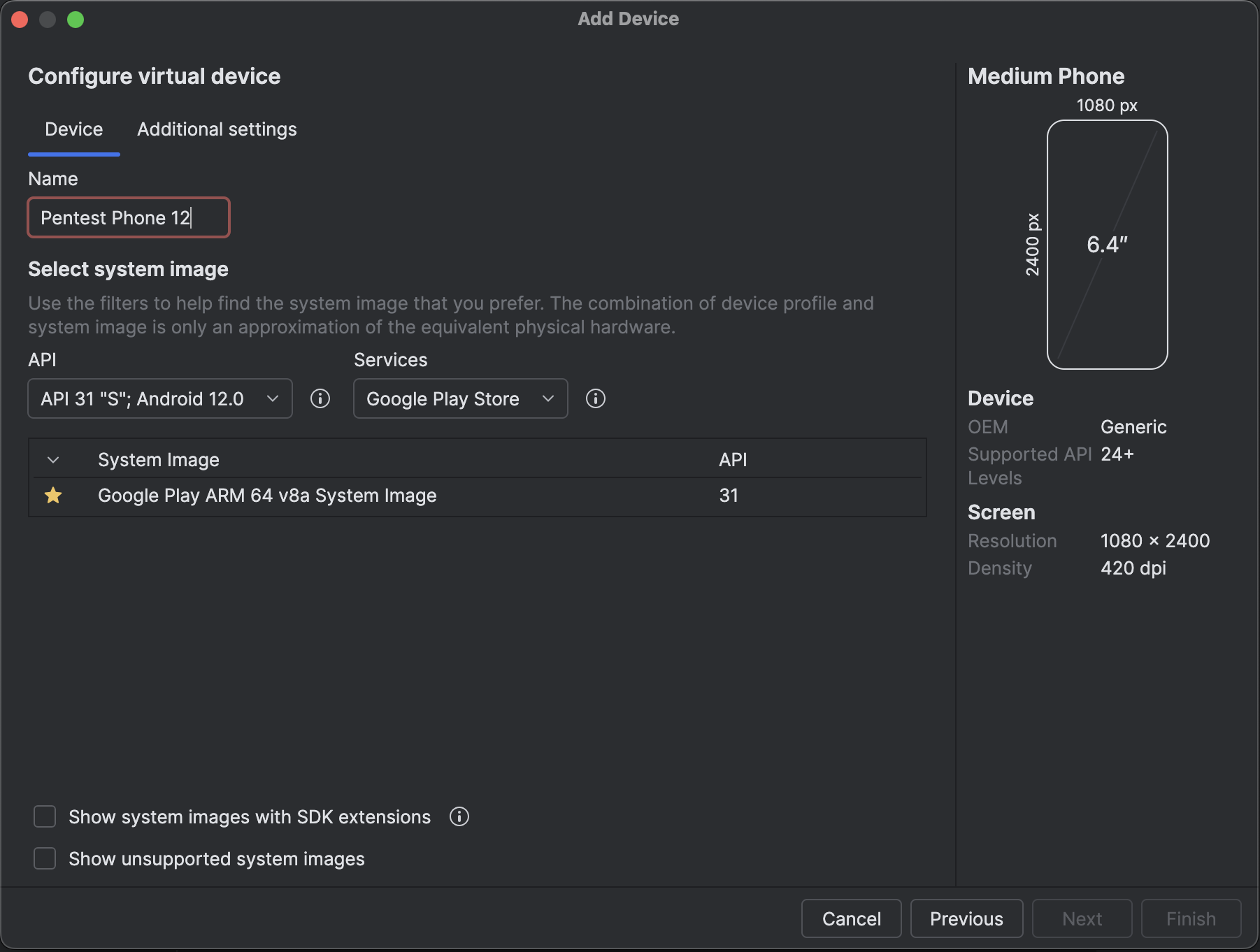
- Start the device to confirm it works (the below command lists all the devices present).
$ emulator -list-avds
Pentest_Phone_12
Rooting the Device#
- Clone the repo https://gitlab.com/newbit/rootAVD.git
- Start the device without restoring snapshots (cold boot).
$ emulator -avd Pentest_Phone_12 -no-snapshot-load
- Run rootAVD in another terminal:
$ cd rootAVD
$ ./rootAVD.sh ListAllAVDs
# ..... this will list the image we downloaded
$ ./rootAVD.sh system-images/android-31/google_apis_playstore/arm64-v8a/ramdisk.img
# ..... REDACTED
Dumping cpio: [ramdisk.cpio]
[*] repacking back to ramdisk.img format
[!] Rename Magisk.zip to Magisk.apk
[*] Pull ramdiskpatched4AVD.img into ramdisk.img
[-]
[*] Pull Magisk.apk into
[-]
[*] Pull Magisk.zip into .
[-]
[-] Clean up the ADB working space
[-] Install all APKs placed in the Apps folder
[*] Trying to install Apps/Magisk.apk
[*] Performing Streamed Install
[*] Success
[-] Shut-Down & Reboot (Cold Boot Now) the AVD and see if it worked
[-] Root and Su with Magisk for Android Studio AVDs
[-] Trying to shut down the AVD
[!] If the AVD doesn't shut down, try it manually!
[-] Modded by NewBit XDA - Jan. 2021
[!] Huge Credits and big Thanks to topjohnwu, shakalaca, vvb2060 and HuskyDG
- Once rooting is done, the emulator may reboot by itself. In case it doesn’t reboot, boot the device again without loading snapshots.
$ emulator -avd Pentest_Phone_12 -no-snapshot-load
- Verify root by checking the user id.
$ adb shell su -c 'id'
Or by opening Magisk app from the device.
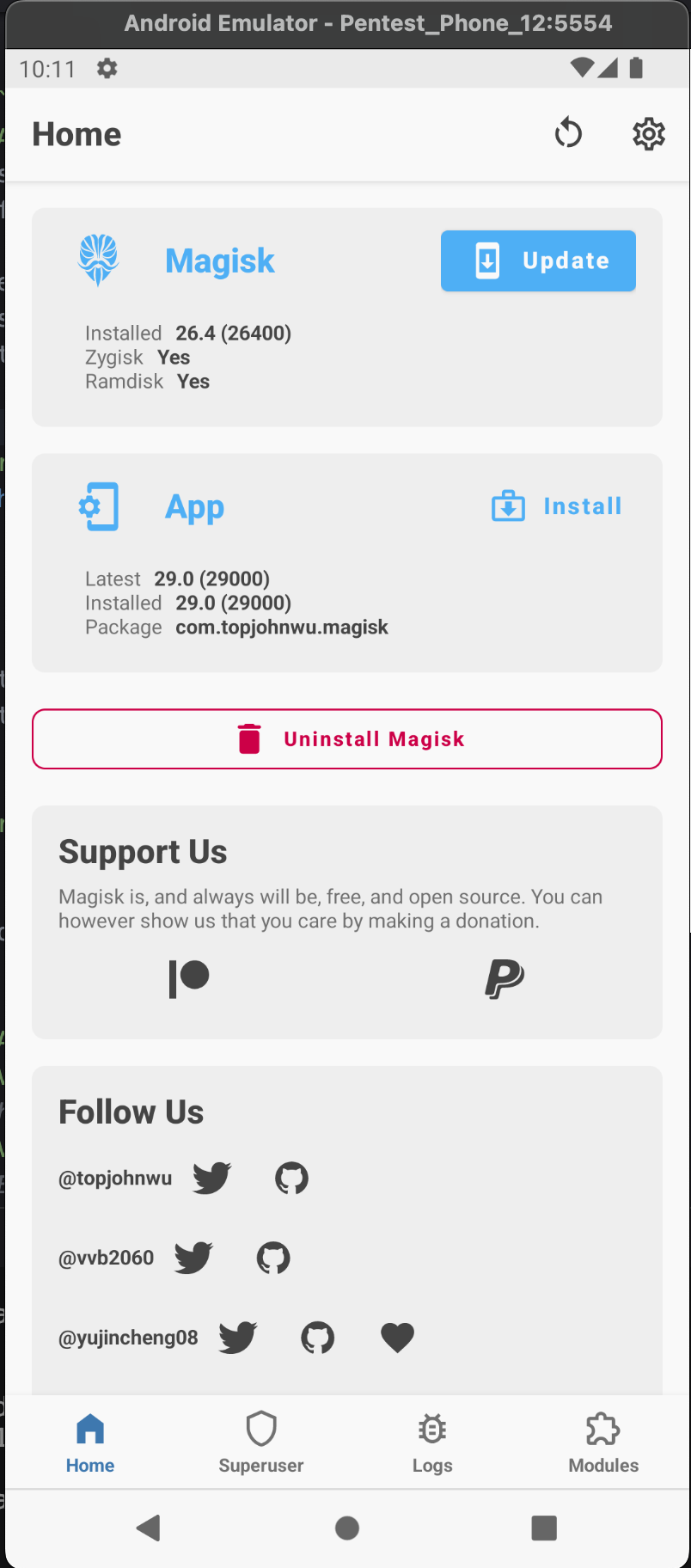
- If it prompts for a full version installation, choose
Install -> Direct Install (Recommended) - Allow the permission if it requests to install from an unknown source.
- Reboot the device once Magisk is updated.
Install Frida#
- Create and activate the Python environment for testing.
$ conda create --name mobile-pentesting-env python=3.11
$ conda activate mobile-pentesting-env
- Install Frida tools.
$ pip install frida-tools
-
Download and extract Frida server binary for Android arm64 from Frida releases page. At the time of writing this, the latest version was 17.5.1 .
-
Run the server on the rooted device.
$ mv frida-server-17.5.1-android-arm64 frida-server
$ adb push frida-server /data/local/tmp/
$ adb shell su -c 'chmod 755 /data/local/tmp/frida-server'
$ adb shell su -c '/data/local/tmp/frida-server &'
- Confirm everything is working.
$ frida-ps -U
This should list the processes running on the device like below.
# .....
 682      com.android.bluetooth
1449      com.android.emulator.multidisplay
 787      com.android.networkstack.process
 803      com.android.se
 694      com.android.systemui
7518      com.android.vending
7927      com.google.android.apps.messaging
1052      com.google.android.apps.nexuslauncher
5175      com.google.android.apps.restore
 961      com.google.android.ext.services
# .....
Conclusion#
I’m now too tired to write the conclusion, and I made a pact that I won’t use chatgpt except for fixing the grammatical errors. But you got the idea right? Go break some apps (ethically, of course).
References#
Read other posts